
YouTube?
Not now.
A free menu bar app for macOS. It blocks the sites that eat your mornings, in every browser at once, by hand or on a schedule. Want them back? One click on “Okay, Now”.
- 10 hours of rain on a tin roof
- Why Japanese trains are never late
- I restored a 1987 calculator
- Every penalty of the season, ranked
Not now.
To open it anyway, choose Okay, Now in the menu bar.
Not Now in 30 seconds
How it works
- Tick your sites
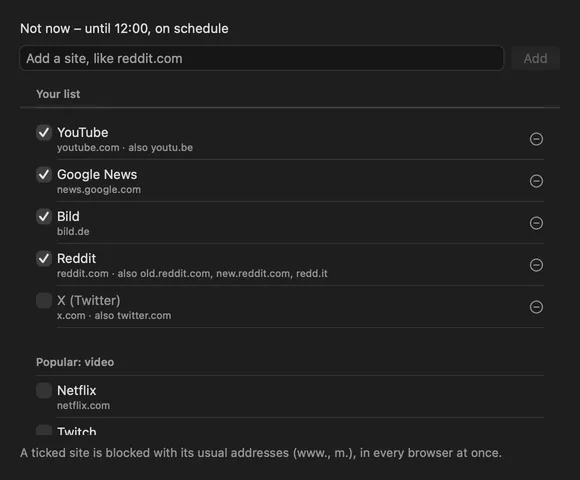
YouTube, Google News and Bild are on the list from the start. Below them Not Now shows the sites you visit most, from your browsing history on this Mac, and a long list of popular ones. Tick what should wait. Each site brings its usual addresses along: www., m., and for YouTube also youtu.be.
- Say not now
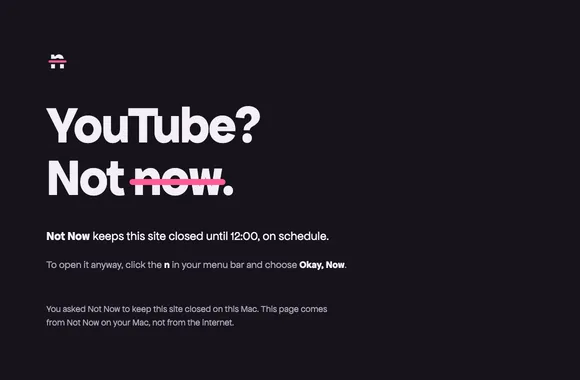
From the menu bar, for 25 minutes up to 4 hours, or on a schedule. From then on the sites don’t load, in any browser. Open one anyway, and the tab shows Not Now’s page instead: YouTube? Not now.
- Okay, now – when you choose
One click in the menu bar, any time, also in the middle of a schedule. Not Now doesn’t make you earn it. The schedule sits out until its end; the next one starts as planned.
The menu bar shows the state


The strike only shows once the block really works.

Psst: talk to your AI, hear nothing else
Our other free Mac app. When Claude Code, ChatGPT voice or your dictation app opens the mic, every other app goes quiet. Calls stay audible.
Get Psst for freeSchedules that start on their own
Weekday mornings, two afternoons a week, a Sunday evening you keep for later: each schedule has its days and its hours. An end before the start runs past midnight.
Schedules start while Not Now is running. With “Start at login” it always is, and it never shows up in the Dock.
Turning a schedule off keeps its days and hours, so it is back with one switch. More in Block websites on a schedule.

When you open a blocked site anyway
A blocked site doesn’t load, and a browser on its own only says it can’t connect, as if the Wi-Fi had gone. Not Now doesn’t leave it at that: the tab gets Not Now’s own page, with the site, until when, and where to open it again.
Tabs that were already open go too. When Not Now starts, every tab on a blocked site gets the page, and a video that was playing stops.
There is no button on the page that opens the site. Okay, Now stays a step in the menu bar, on purpose: one click in the moment is too easy.
Works in Safari, Chrome, Arc, Brave, Edge and Vivaldi. macOS asks once per browser whether Not Now may control it; Not Now only reads the address of a tab, on your Mac. In Firefox and other apps a card in the middle of the screen says what happened. Both can be switched off in Settings, General.
Every browser, one list
Not Now writes your sites into the hosts file of your Mac. That is the list macOS checks before it asks the internet for an address. Safari, Chrome, Firefox, Arc and every app that loads a page ask macOS, get an address on your own Mac instead of the real one, and the page never arrives.
Tested on 23 October 2026 with Safari’s engine and with Chrome, also with Chrome’s own DNS client: the blocked site doesn’t load, the next one does.
# >>> Not Now >>> sites blocked while Not Now is on.
127.0.0.2 youtube.com
:: youtube.com
127.0.0.2 www.youtube.com
:: www.youtube.com
# <<< Not Now <<<
127.0.0.2 is your own Mac: Not Now answers there while it blocks. Not Now only edits the lines between its own markers. Everything else in the file stays as it is, byte for byte. How it works step by step: Block websites with the hosts file.
What Not Now never does
- It never holds you hostage. Not Now helps you keep a plan; it does not punish you for changing it.
- It never goes online. There is no account and no cloud behind it. What you block stays on your Mac.
- It never touches the rest of your hosts file. Your own entries stay as they are.
- No third-party code. Apple frameworks only: AppKit, SwiftUI, Service Management. One Swift file, which will be published as a public repository.
- It never blocks your Mac’s own needs. Apple’s update and iCloud addresses and your local network are left alone, whatever the list says.
- Its log is yours. A small file on your Mac lists when Not Now blocked sites and opened them again. It goes nowhere.
Install
- Download and drag
Open NotNow.dmg and drag Not Now into your Applications folder. About one megabyte.
- Open it once with “Open Anyway”
Not Now is not notarised by Apple yet, so macOS blocks the first start. Open System Settings, go to Privacy & Security, scroll down to the note about Not Now and click “Open Anyway”.
- Set up blocking
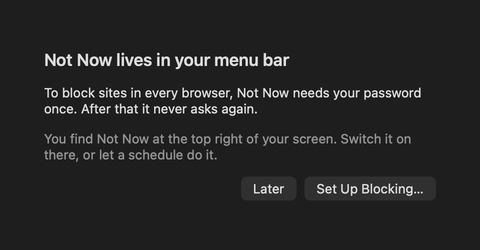
Not Now asks once for your password to set up its helper. macOS may show a note that a background item was added: that is the helper.
- Allow your browser
The first time you say Not Now, macOS asks whether Not Now may control Safari or Chrome. Allow it, and a blocked tab shows Not Now’s page.
- Start at login
Optional. In Settings, General, tick “Start Not Now at login”, so your schedules always run.
Guides
- How to block YouTube on a Mac: in Safari, Chrome and every other browser, including youtu.be.
- Three ways to block websites on a Mac: Screen Time, the hosts file by hand, or an app.
- Block websites with the hosts file: the Terminal steps, and what to watch out for.
- Block websites on a schedule: weekday mornings, past midnight, and unblocking any time.
Questions
Does Not Now work in Chrome and Firefox too?
Not Now blocks through the hosts file of your Mac, which browsers check before they look up an address, also Chrome with its own DNS client. We tested Safari’s engine and Chrome; Firefox reads the same file, its own test is still to come. No browser extension needed.
Can I unblock in the middle of a schedule?
Yes. “Okay, Now” in the menu bar, whenever you like. The schedule sits out until its end; the next one starts as planned.
A video is already open. Does it stop?
Yes, in Safari, Chrome, Arc, Brave, Edge and Vivaldi: when Not Now starts, a tab on a blocked site gets Not Now’s page, and the video stops. In other browsers a page that has loaded stays on screen until you reload it.
Does Not Now read my browsing history?
Only to suggest sites, and only on your Mac. When you open Sites, Not Now counts the visits per site of the last 30 days in the history files of Chrome, Safari, Firefox, Arc, Brave, Edge and Vivaldi. Mail, logins, work tools and search engines are left out. The result stays in memory while the app runs; nothing is stored or sent. macOS keeps browser histories behind Full Disk Access, so the suggestions appear once you add Not Now there, with + or by dragging it into the list. Without it, or with the suggestions switched off in Settings, General, everything else works the same.
Why does Not Now want to control my browser?
To give a tab on a blocked site its own page instead of the browser’s connection error. macOS asks once per browser. Not Now then reads the address of the tab in front while sites are blocked, compares it on your Mac and stores nothing. Say no, and blocking works all the same; a card in the middle of the screen does the telling.
Can Not Now block a single page, like YouTube Shorts?
No. The hosts file knows addresses, not pages, so a site is blocked as a whole. You can block a subdomain on its own, for example news.google.com without the rest of Google.
Can Not Now block apps?
Not yet. Not Now blocks websites, in every browser and every app that loads them.
Why does Not Now need my password?
The hosts file belongs to the system. Once, Not Now sets up a small helper that may edit it, and macOS asks for your password for that. The helper only changes Not Now’s own lines. The app itself runs with your normal rights.
What happens when I quit Not Now?
Every site opens again. Not Now blocks while it runs, and schedules only start while it runs. If it ever crashes, the helper opens the sites again after five minutes on its own.
How do I remove Not Now completely?
In Settings, General, click “Remove Helper…”: that takes Not Now’s lines out of the hosts file and removes the helper. Then quit Not Now and drag it to the Trash.
Does Not Now send anything anywhere?
No. Not Now has no network code at all. It is built with Apple frameworks only, and what you block stays on your Mac.
Something isn’t working. Who do I tell?
Write to info@createbetter.design. If you can, attach the last lines of the log: Settings, General, “Show Log”. It lists when Not Now blocked sites and opened them again, nothing else.
Does it cost anything?
No. Not Now is free, now and later.
Not Now 1.3 for macOS
Blocks distracting sites in every browser. By hand or on a schedule. Free.
Download for macOS