
Not Now / Block YouTube
How to block YouTube on a Mac
YouTube is one site with several addresses. Block only youtube.com, and a shared youtu.be link or the mobile site still gets you in.
Short answer: Block every name YouTube uses, at least youtube.com, www.youtube.com, m.youtube.com and youtu.be, in the hosts file of your Mac. Then every browser gets an empty address instead of YouTube. Not Now does that from the menu bar, by hand or on a schedule, and one click lets YouTube back in. Reload tabs that were already open.
The names YouTube answers to
A block works on names, so it is only as good as the list of names. These are the ones that matter on a Mac:
| Name | Where you meet it | Blocked by Not Now |
|---|---|---|
youtube.com, www.youtube.com | The site itself, and videos embedded on other sites | Yes |
m.youtube.com | The mobile site, often behind links sent from a phone | Yes |
youtu.be, www.youtu.be | Short links from the Share button | Yes |
music.youtube.com | YouTube Music, a name of its own | Only if you add it |
www.youtube-nocookie.com | Embeds in privacy-enhanced mode | Only if you add it |
Embedded players load from www.youtube.com/embed/… by default, so blocking YouTube also empties the video boxes on blogs and news sites. Sites that use privacy-enhanced mode load the player from youtube-nocookie.com instead, as YouTube's help on embedding describes. If those embeds pull you in, add that name too.
Why it has to work below the browser
A browser extension blocks YouTube in the browser it is installed in. If there is a second browser on your Mac, the one without the extension is where the evening goes.
The hosts file sits underneath all of them. Before a browser asks the internet where youtube.com lives, it asks macOS, and macOS looks in /etc/hosts first. If the file says 0.0.0.0, the page cannot connect. We tested this on 23 October 2026 with WebKit, the engine behind Safari, and with Chrome, also with Chrome's own DNS client switched on: YouTube did not load, other sites did. Firefox reads the same file; our own test round with it is still to come.
Screen Time, which comes with macOS, can restrict websites too. Apple's guide lists that filter under Safari and does not say whether other browsers follow it. The three ways to block websites on a Mac compares them side by side.
Block YouTube with Not Now
- Install it once
Drag Not Now into Applications. It is not notarised by Apple yet, so the first start needs “Open Anyway” in System Settings, Privacy & Security. Then it asks once for your password to set up its helper.
- YouTube is already on the list
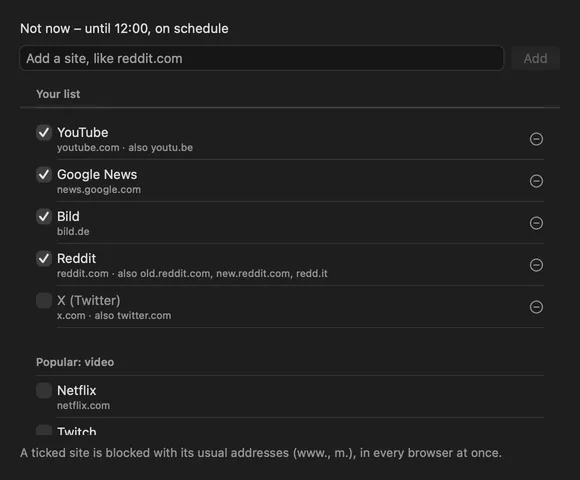
youtube.com comes ticked, with www., m. and youtu.be included. Google News and bild.de are there as well; untick what you want to keep.
- Say “Not Now”
Click it in the menu bar, pick “Not Now For” 25 minutes up to 4 hours, or let a schedule do it every morning.
- Changed your mind?
“Okay, Now” in the same menu lets YouTube back in, any time, also in the middle of a schedule.
Tabs that are already open
A page that has loaded stays on screen. A video that is already buffered can play on for a while, and a browser may keep its connection to YouTube open for a moment. Reload the tab, and it can no longer reach the site. Not Now empties the DNS cache of your Mac each time it blocks, so every new lookup gets the blocked answer straight away.
What this way cannot do
- Block only Shorts or only the home feed. The hosts file knows names, not pages.
youtube.com/shortsis youtube.com, so it is all or nothing. - Block YouTube on your iPhone. The hosts file belongs to this Mac. Your other devices are not affected.
- Block apps. Not Now blocks websites. An app that looks up youtube.com through macOS gets the same empty answer, but Not Now does not stop apps from opening.
If you would rather do it all by hand, the hosts file guide has every line and command. For everything else, see how Not Now works and the questions on the home page.
Last checked 23 October 2026.